

Installing Line Filters
We put the number of line filters that you requested in your DSL modem box. Please let us know if you require any more. Every phone, FAX, and dial-up modem that uses the same phone line as your DSL service needs a line filter.
Installation Instructions
- Plug the thin end of the line filter into the wall jack (circled in red in the picture).
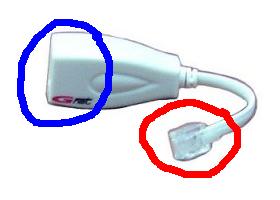
- Plug your phone, FAX, or dial-up modem into the fat end of the line filter (circled in blue in the picture).
- Make sure that there is NO LINE FILTER plugged into the wall jack that you are using for your DSL modem, otherwise your DSL modem will not work.